Remote OpenWrt - Cloudflare ZeroTrust
14 February 2023 -
9 mins read time
Tags:
TTL
OpenWrt
Modem
Page not found or adblock is active!
(1) Type URL correctly
(2) Enable javascript
(3) Disable adblock software, extensions, DNS, etc.
(4) Try another browser.
Then you can go to Home or go back to previous page.
Back to Previous PageIndex
Tutorial Bahasa Indonesia
Tentang
Mengatur OpenWrt dari jarak jauh melalui domain dengan menggunakan Cloudflare ZeroTrust Tunnel, aplikasi ini merupakan alternatif TERMURAH dari ZeroTier, pagekite.me, ngrok.io yang memiliki kesamaan fungsi, dan tunnel ini tidak mengharuskan pengguna untuk menggunakan VPN dari aplikasi seperti Zerotier.
Pengaturan Domain di Cloudflare Dashboard
- Buatlah domain apapun, di situs manapun.
- Pergi ke Cloudflare Dashboard dan login, jika belum memiliki akun, silahkan mendaftar terlebih dahulu.
-
Lihat tab
Websitedibagian kiri layar, lalu klikAdd Site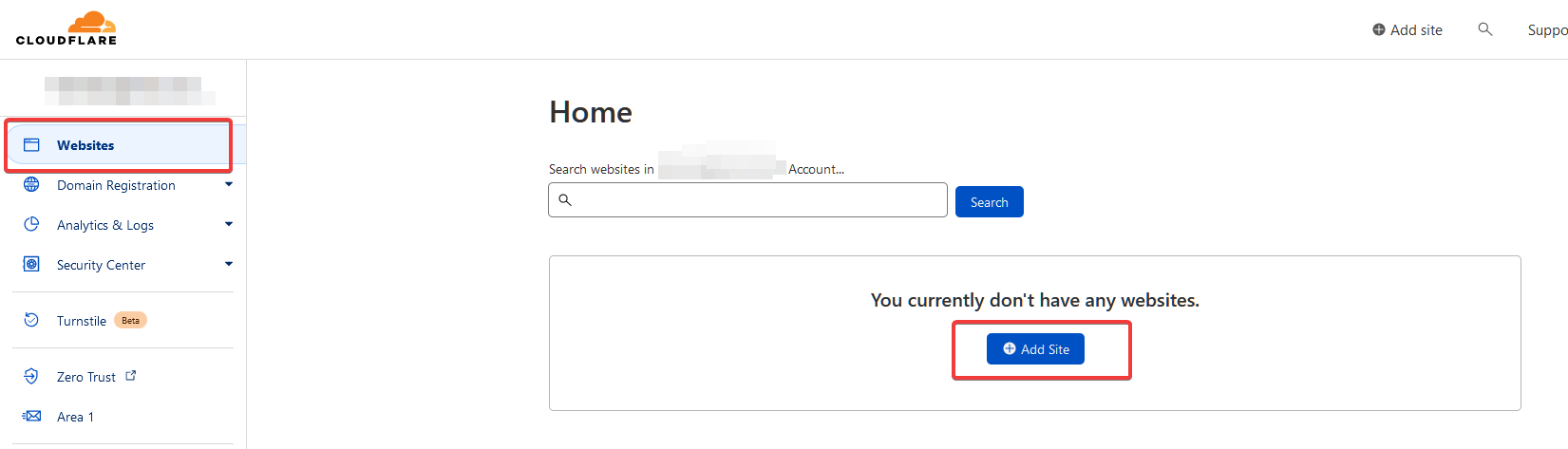
-
Cari domain yang sudah di daftarkan di langkah pertama, lalu tekan tombol
Add Site.Jika muncul Invalid domain seperti gambar dibawah:
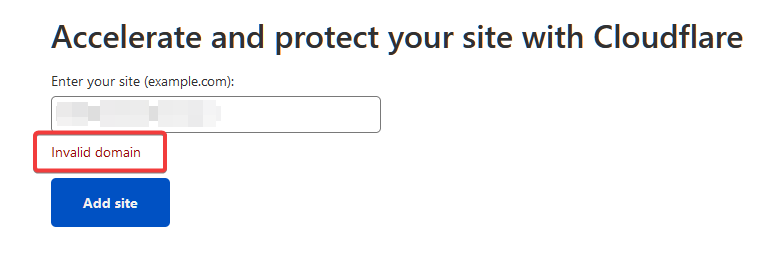
Maka pergilah ke situs atau tempat anda membeli domain, lalu matikan
Registrar Lockseperti contoh dibawah: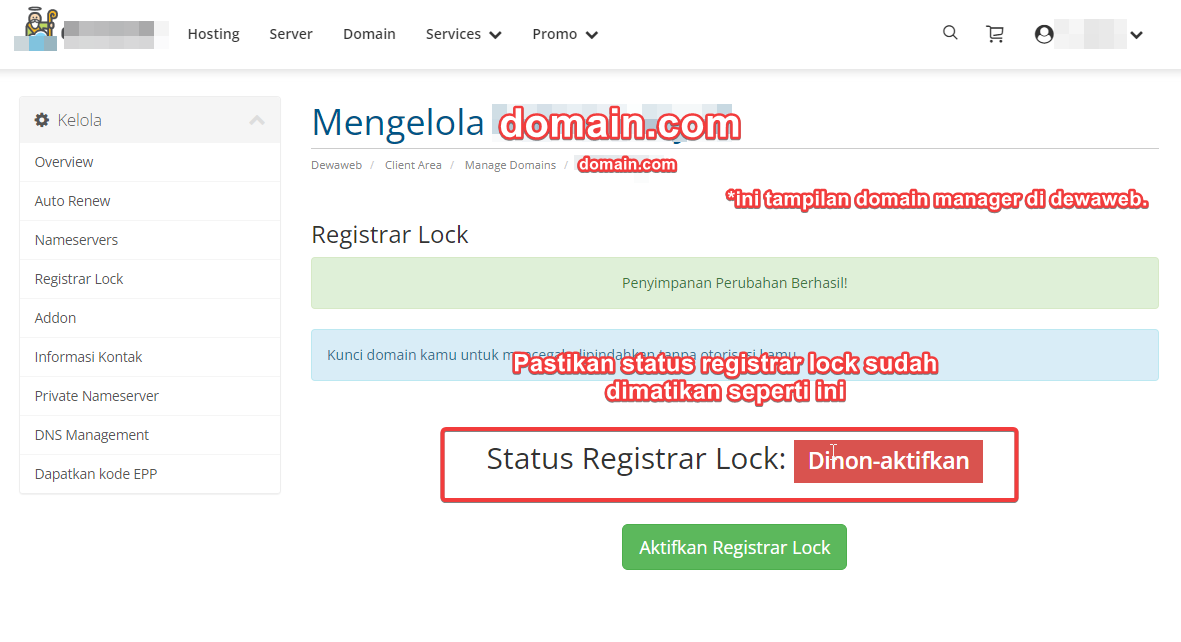
-
Setelah selesai menambahkan situs, Pada
Step (1) Select plan, pilihFREE Plan(ada di bawah sendiri).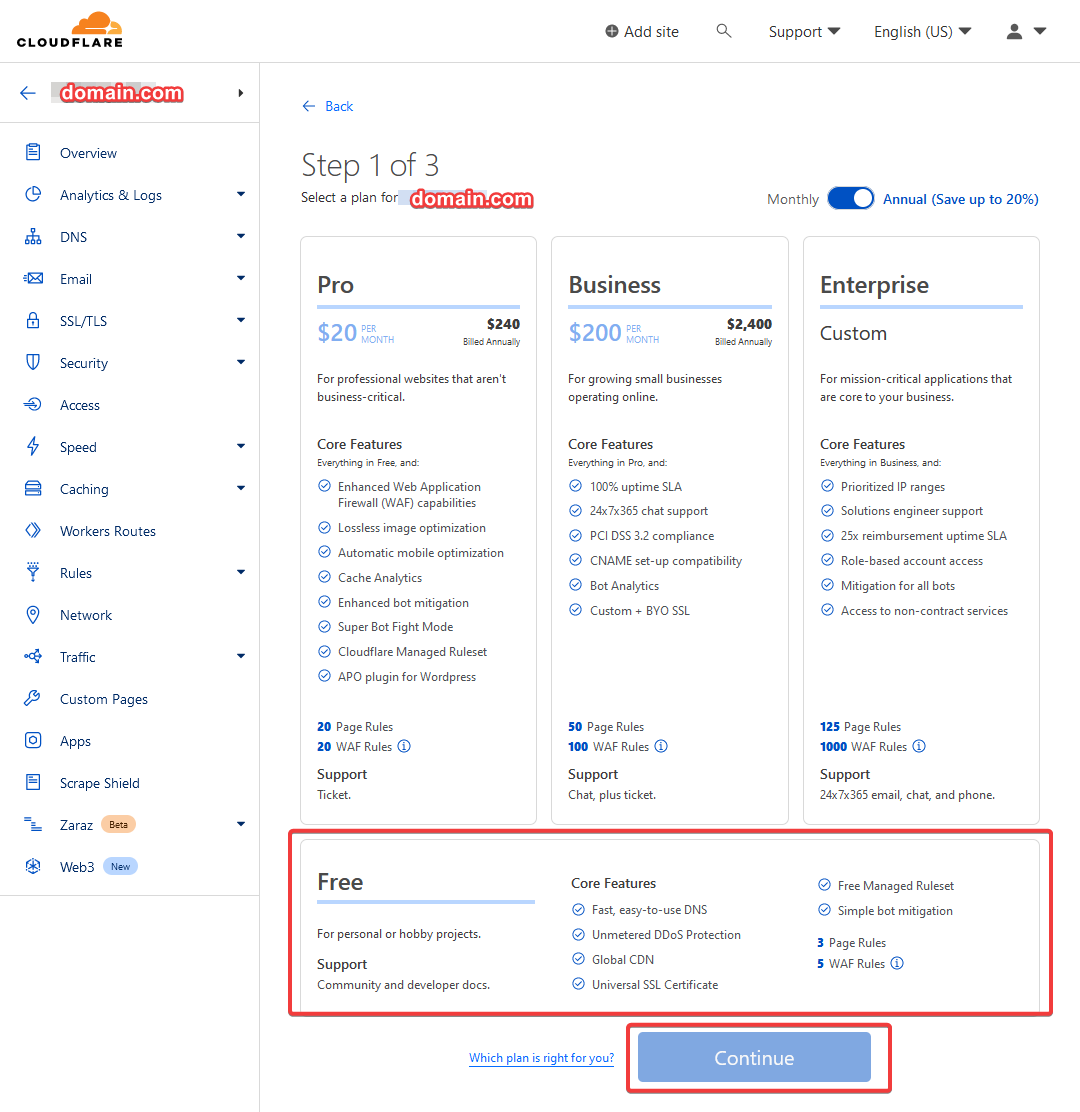
-
Pada
Step (2) Review DNS Recordbisa langsung scroll ke bawah untuk menekan tombolContinue.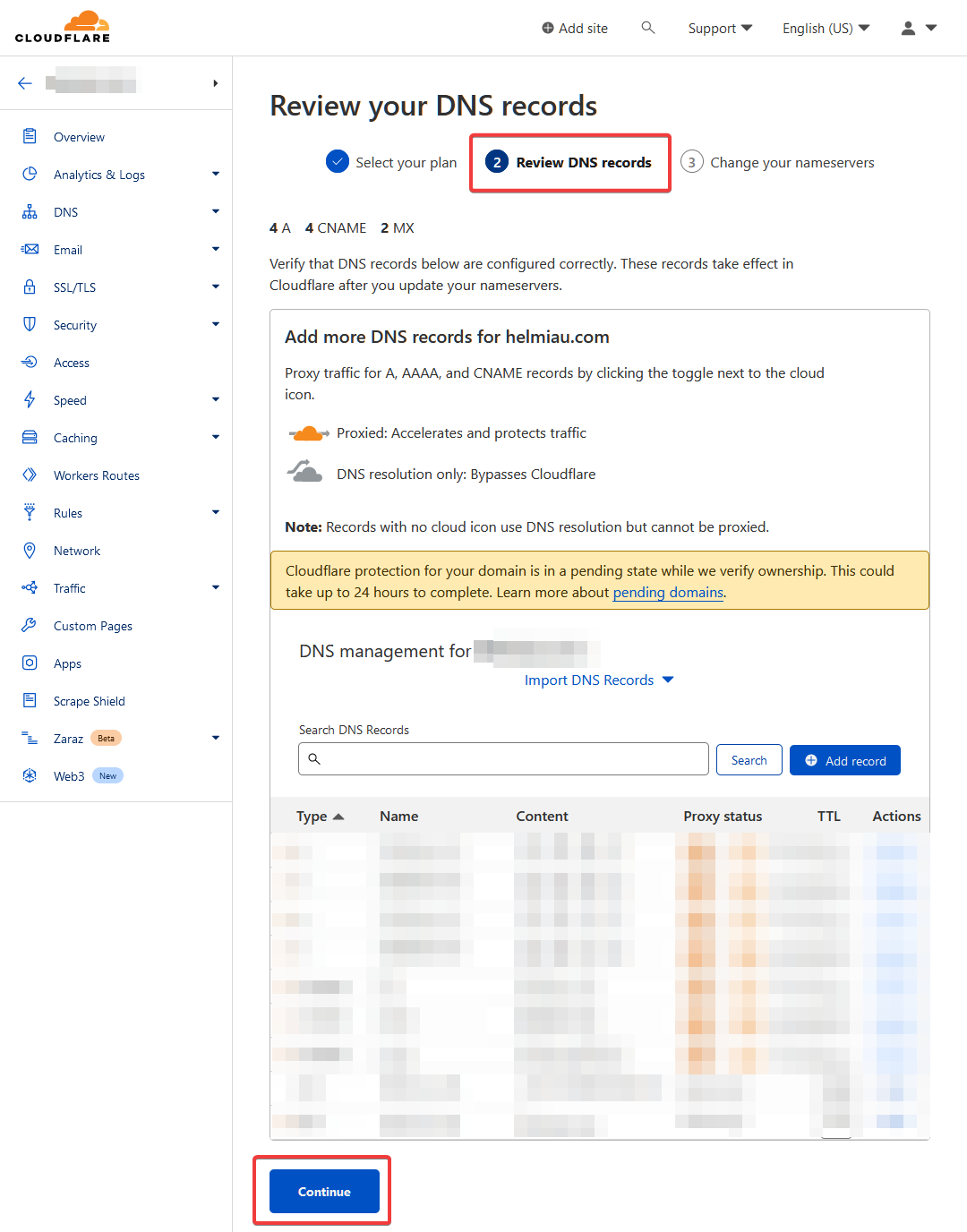
-
Pada
Step (3) ganti nameserverubah nameserver pada domain sesuai dengan nameserver yang sudah disediakan dari cloudflare (lihat screenshot), lalu klik tombolCheck nameservers.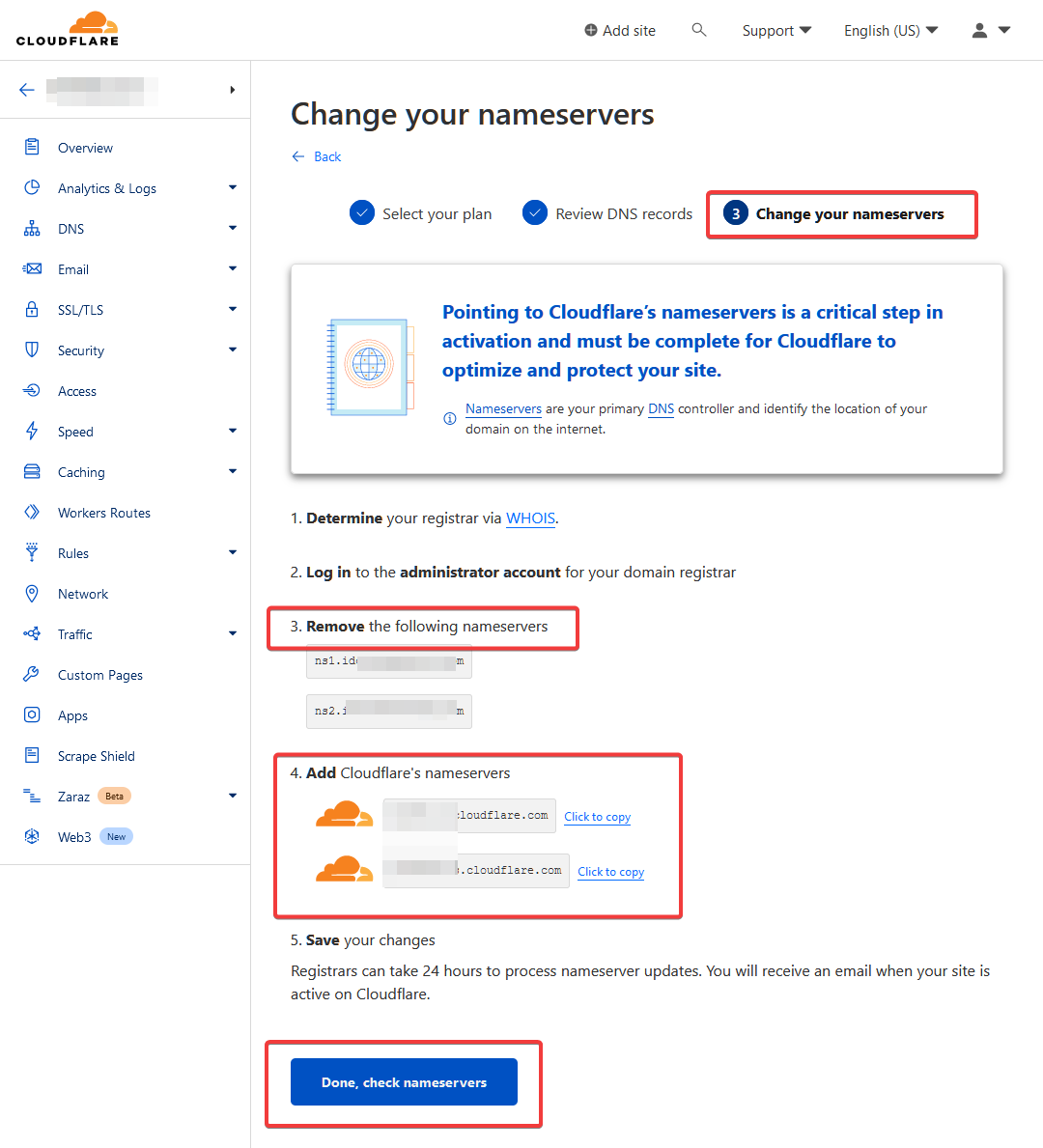
-
Setelah itu, kamu akan diarahkan ke halaman
Quick Start Guide, ikuti saja langkah pada beberapa gambar dibawah ini: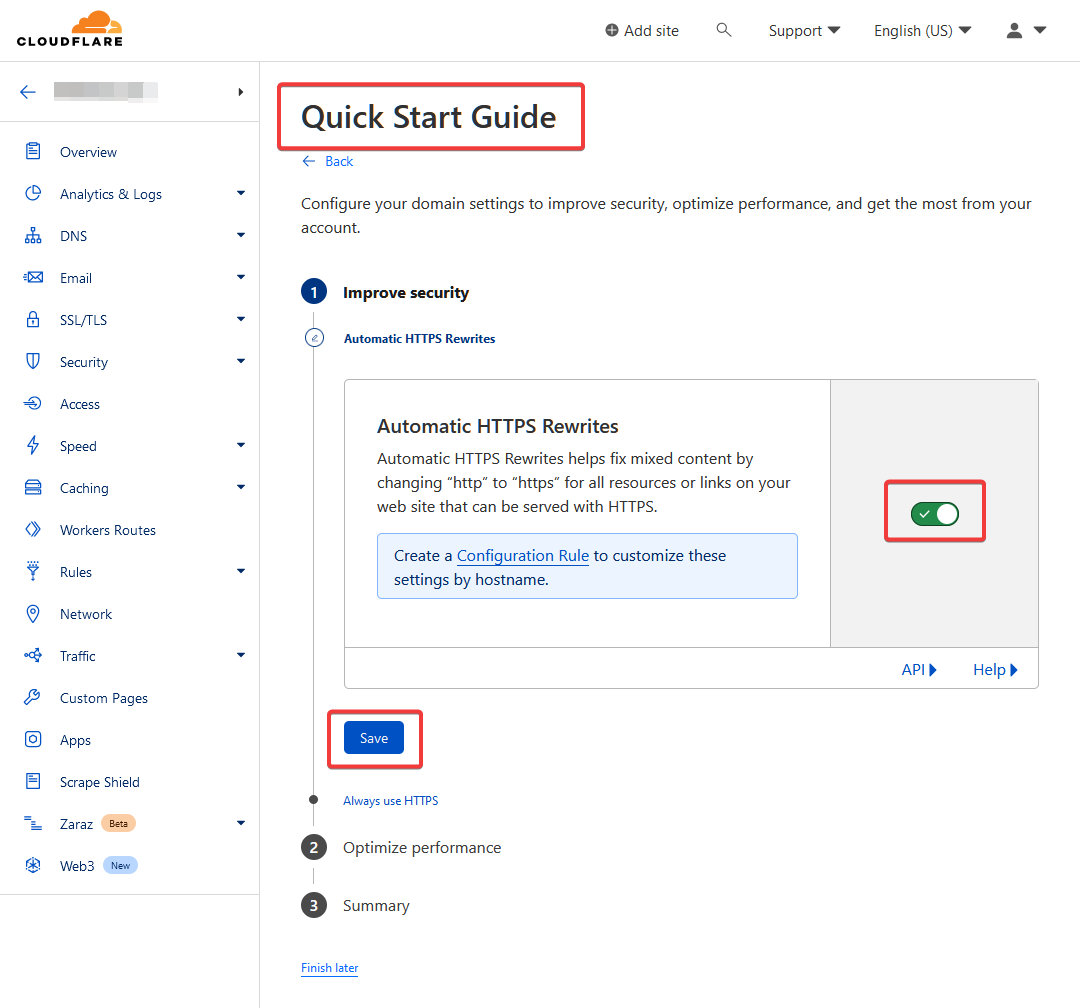
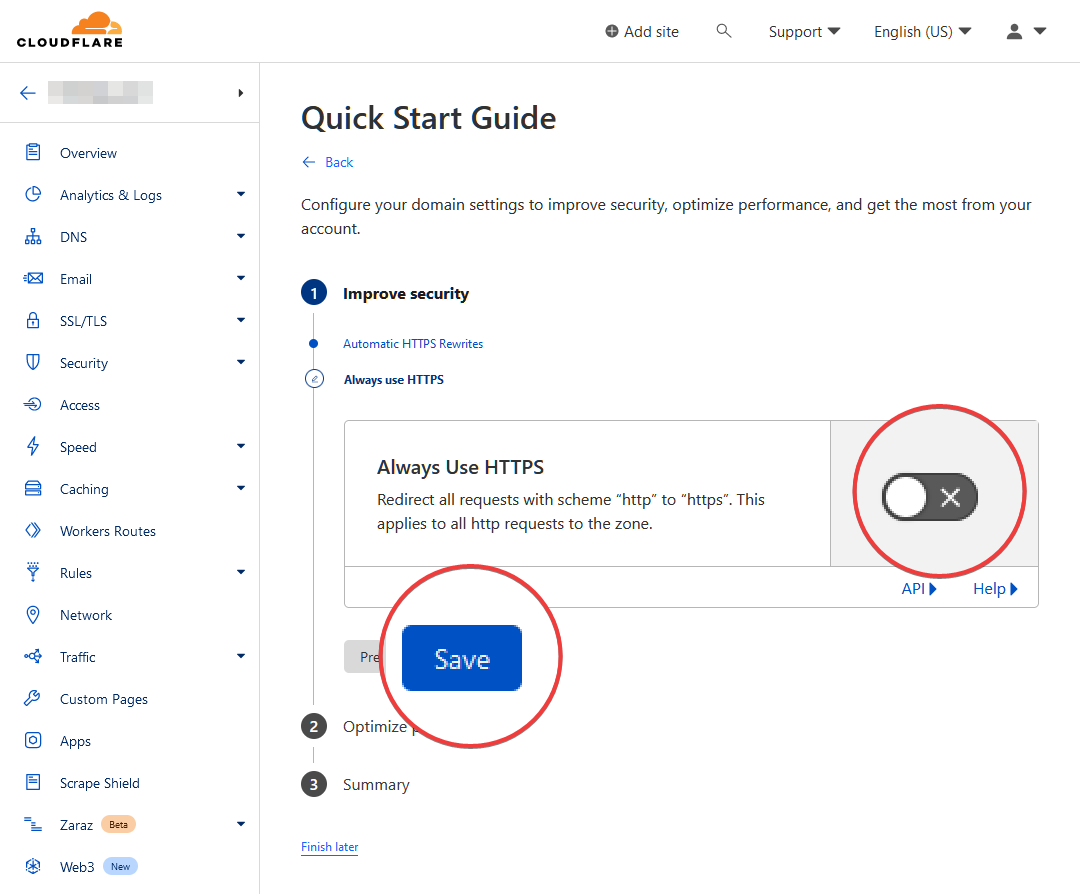
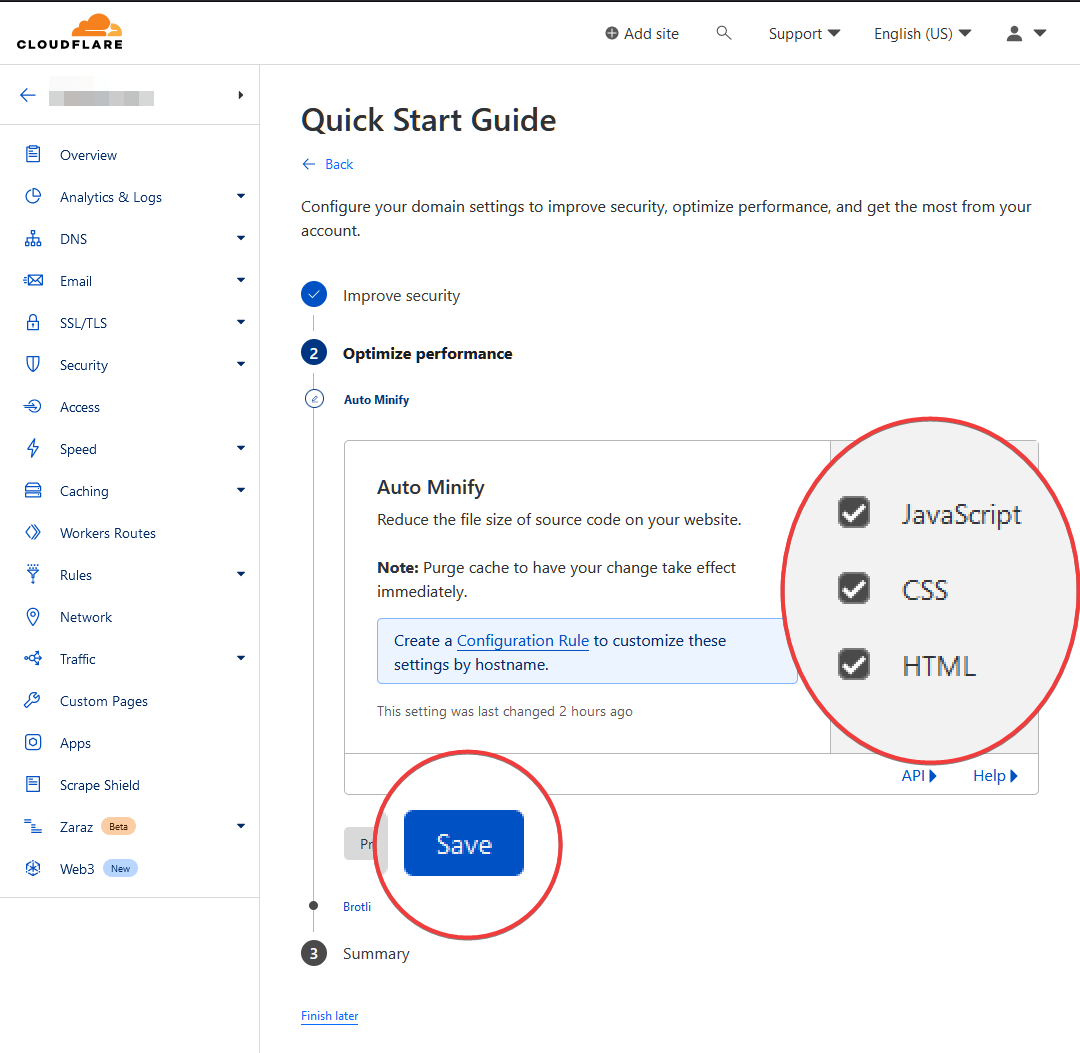
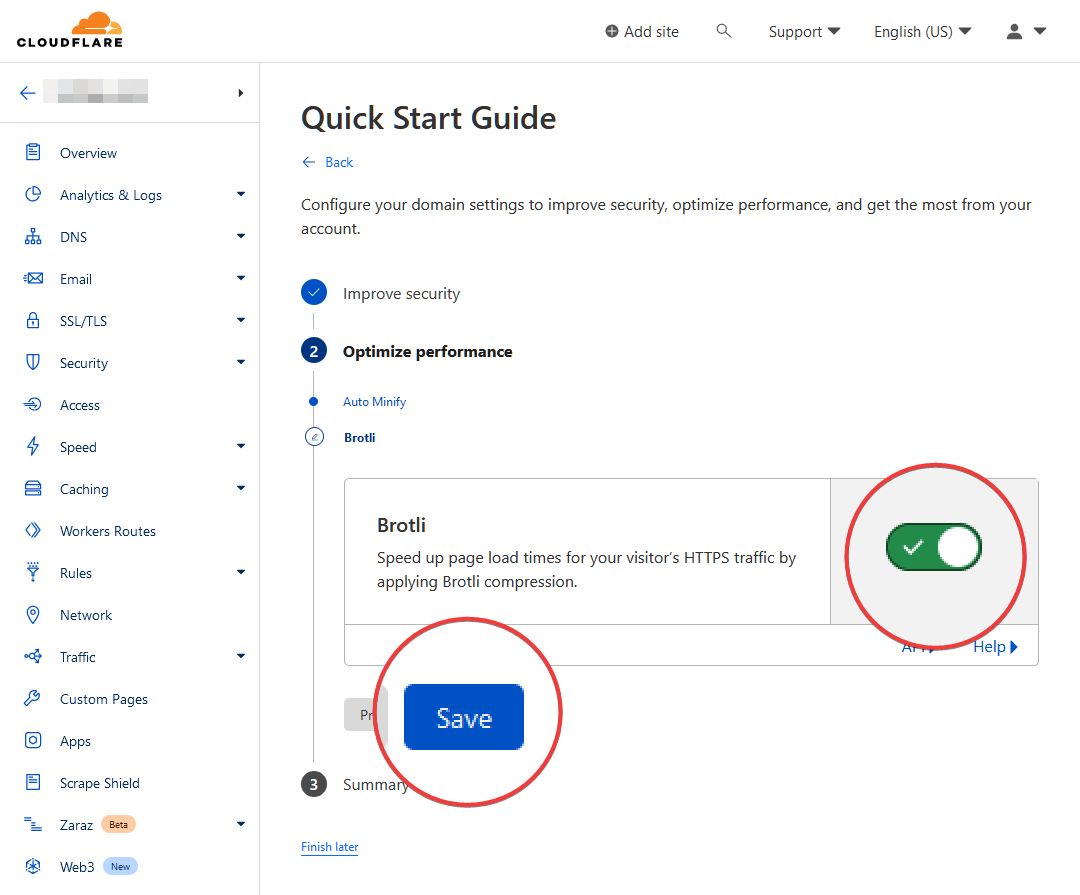
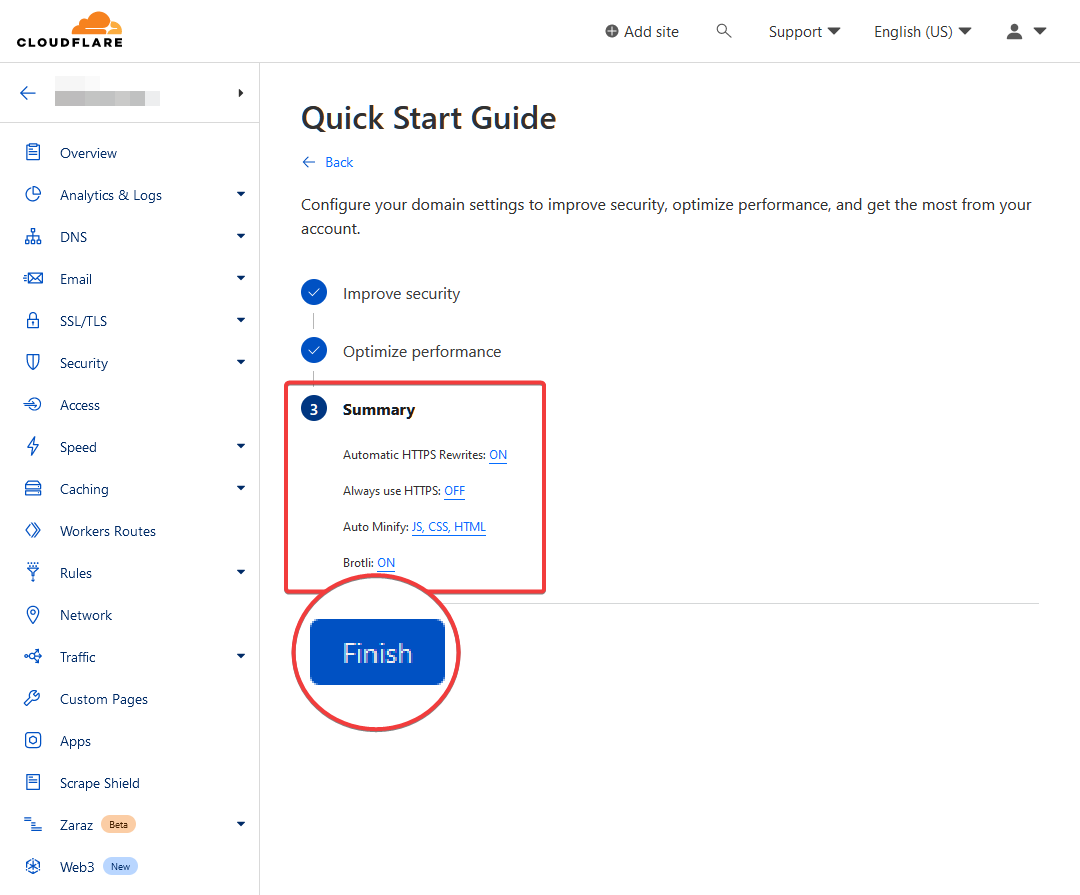
Pastikan kamu sudah melihat tampilan dibawah ini:
-
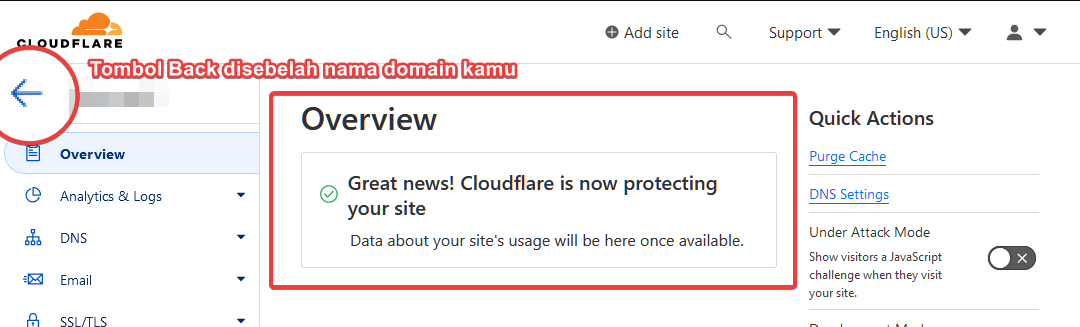
Setelah selesai, tekan tombol kembali disebelah nama domain kamu, nanti akan diarahkan ke halaman
Website, pastikan domainmu sudah seperti dibawah ini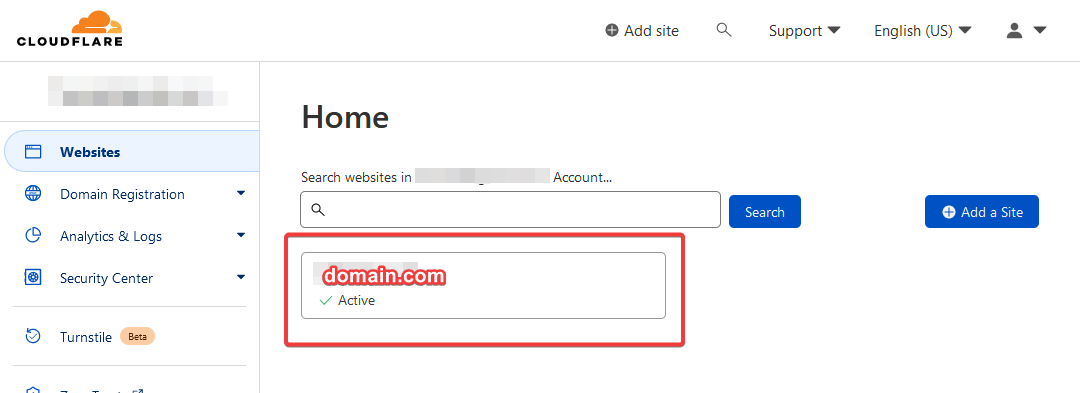
Pengaturan Tunnels di Cloudflare ZeroTrust Dashboard
- Pergi ke Cloudflare ZeroTrust Dashboard, pastikan sudah login.
-
Masuk ke tab
Access>Tunnels, lalu tekanCreate a tunnel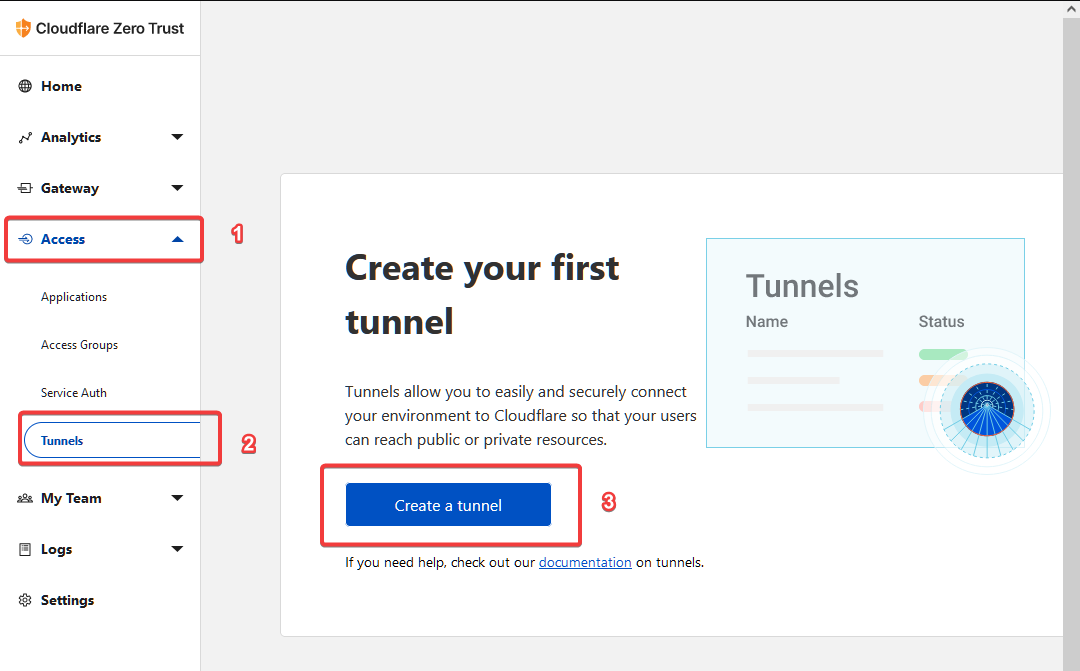
-
Beri nama tunnelmu (1), lalu tekan
Save tunnel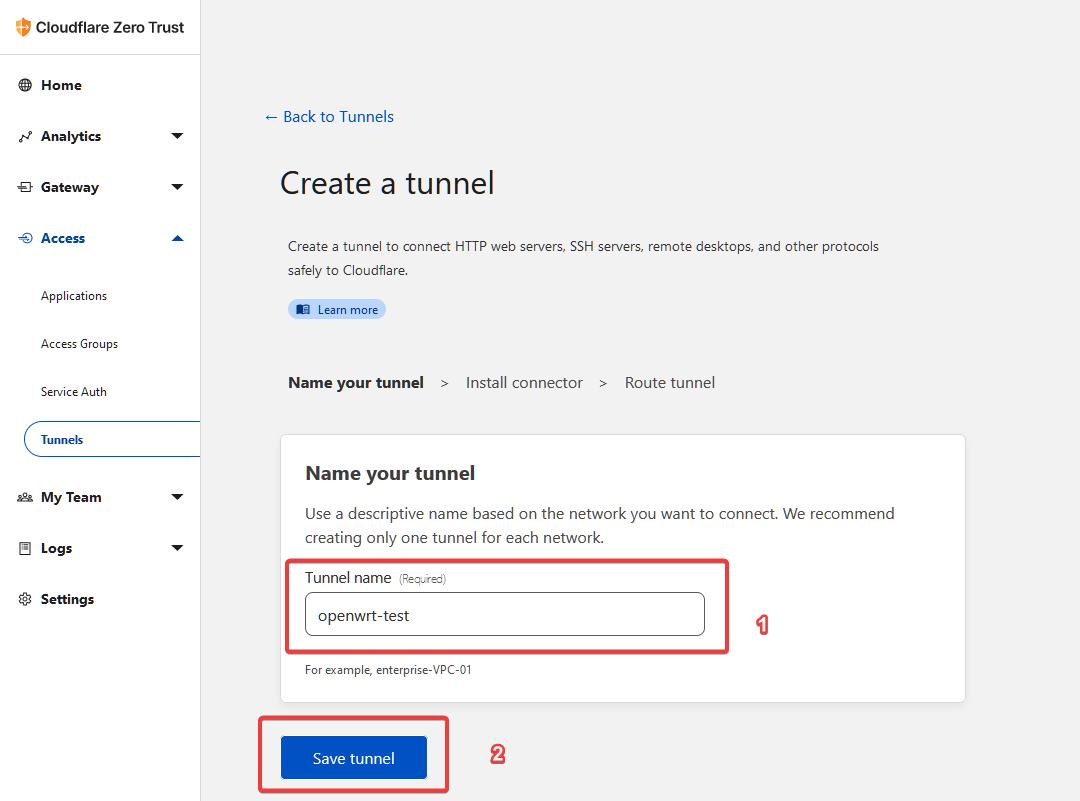
-
Buka Terminal/Putty/XTERM dan semisalnya, lalu jalankan perintah dibawah ini
 wget -qO /root/cfdmgr "https://raw.githubusercontent.com/GegeDesembri/openwrt-tools/master/cloudflared/cfdmgr" && \
 chmod +x /root/cfdmgr
Maka akan seperti ini

-
Jalankan command
/root/cfdmgr iuntuk memasang Cloudflared pada OpenWrt. Nanti akan seperti gambar di bawah ini. Ketika ada tulisan💬 Enter New Cloudflared Token: (leave empty if no change)` silahkan kembali ke browser yang berada pada web Dashboard Cloudflare ZeroTrust untuk menyalin token.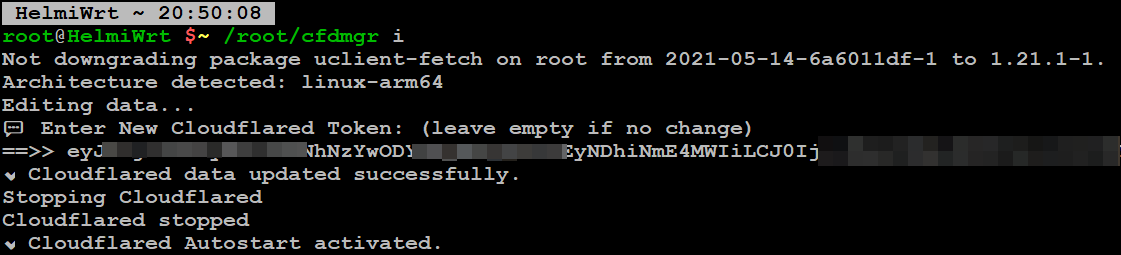
-
Kembali ke halaman
Install Connector, pilih tabWindows-64-bit, lalu tekanIkon Salindi sebelah kanan tulisan token random seperti dibawah ini.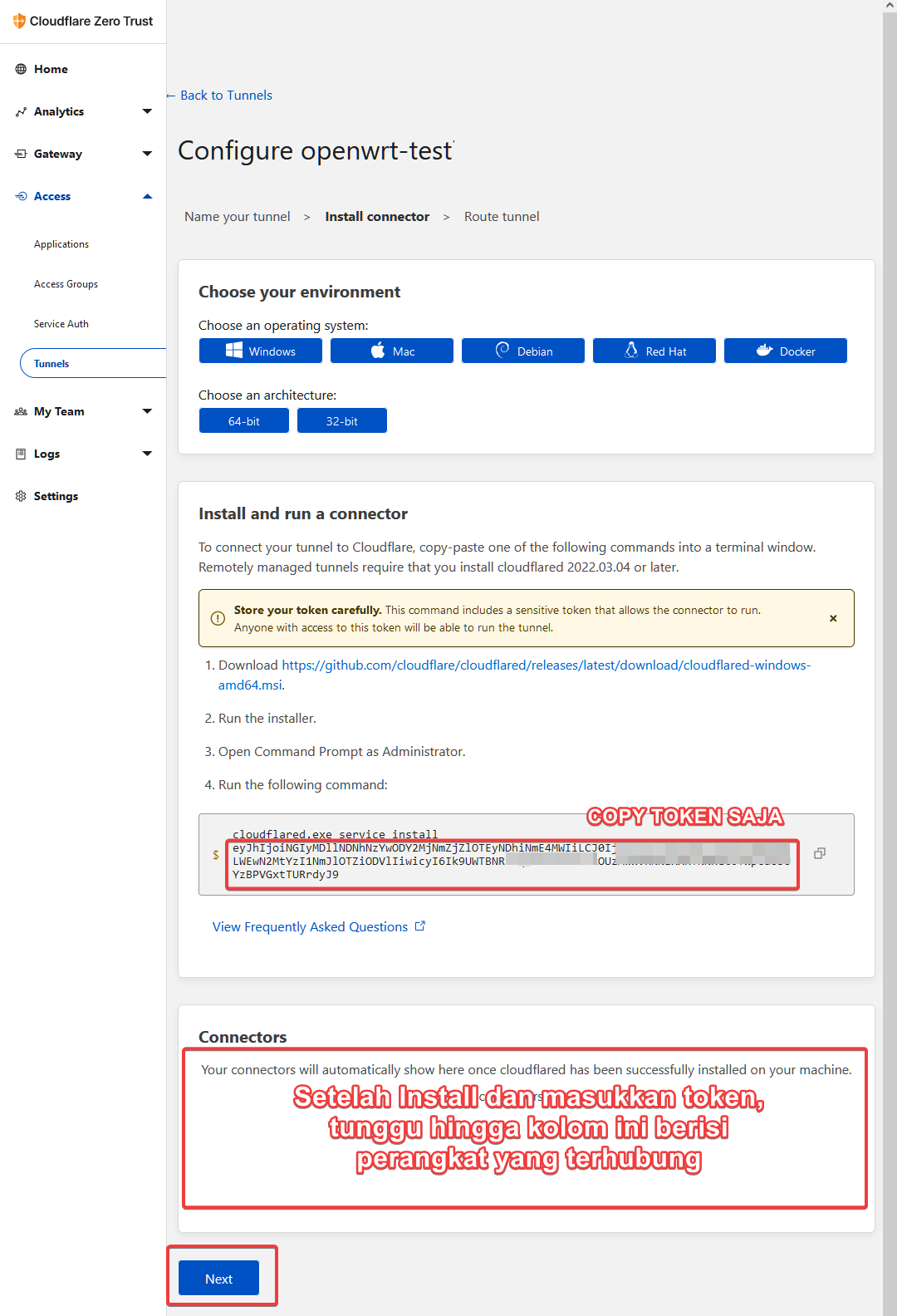
Setelah disalin, silahkan kembali ke Terminal/Putty/XTERM tadi untuk mem-paste token dan menyelesaikan instalasi seperti pada gambar no. 5. Lalu pastikan bagian bawah yang berjudul
Connectorssudah muncul baris seperti dibawah ini, Lalu tekan tombolNext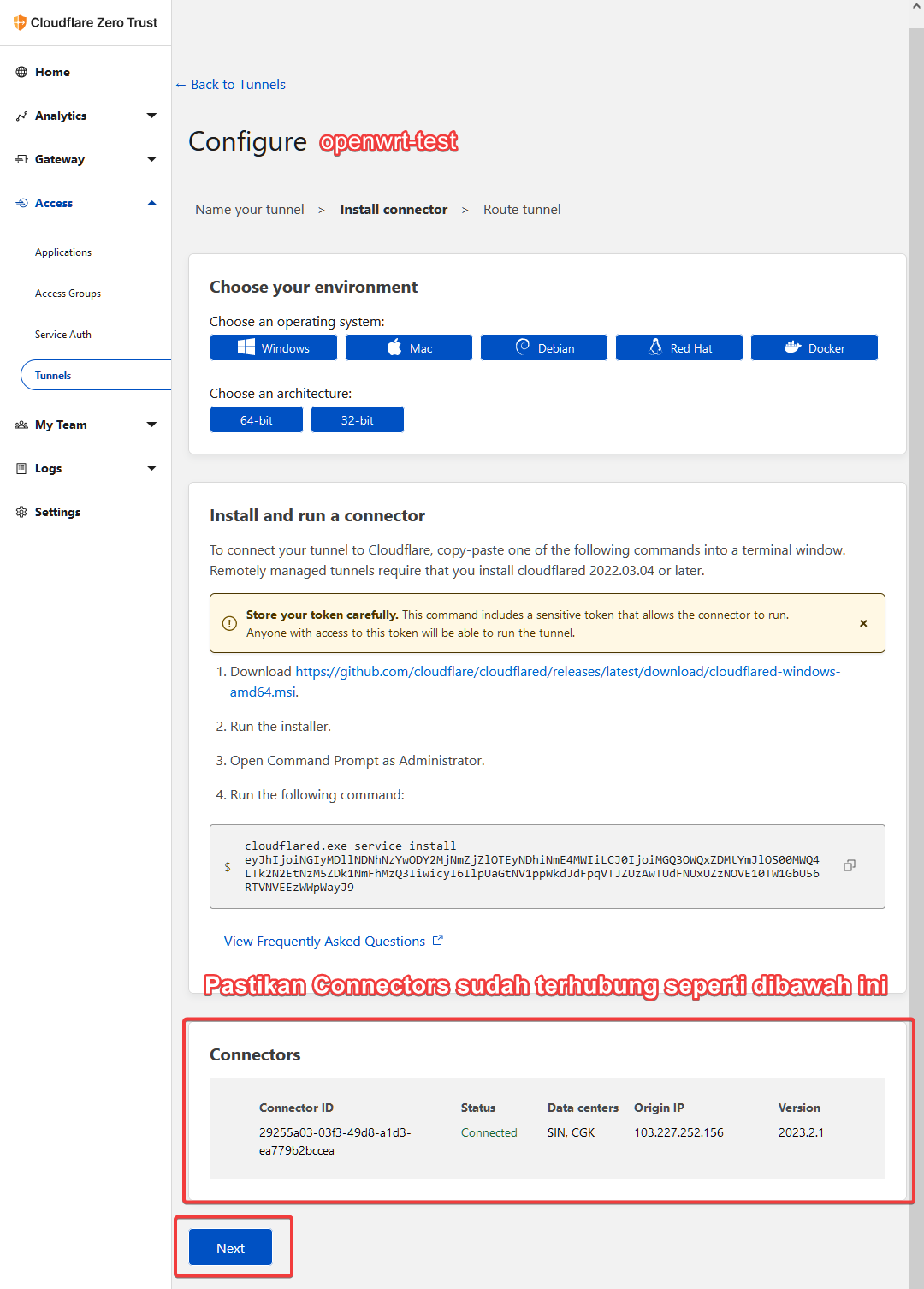
-
Pada halaman
Route tunnel, isi kolom yang tersedia pada bagianPublic Hostnamesseperti tanda pada gambar di bawah ini, lalu tekanSave nama_tunnel tunneldi bagian bawah.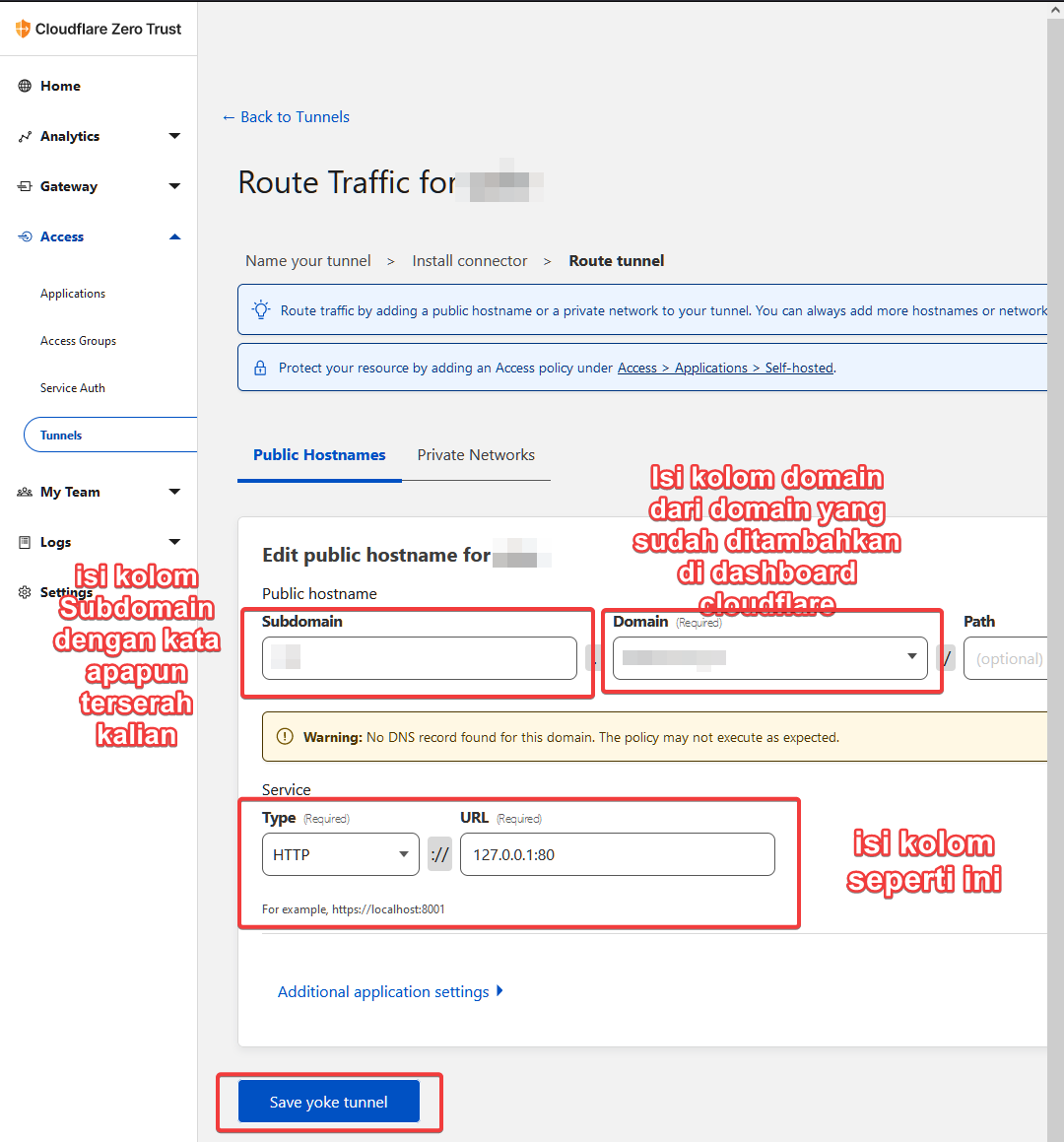
-
Kembali ke tab
Access>Tunnels, lalu tekan tunnel yang sudah dibuat tadi, pastikan statusnyaHEALTHYseperti gambar dibawah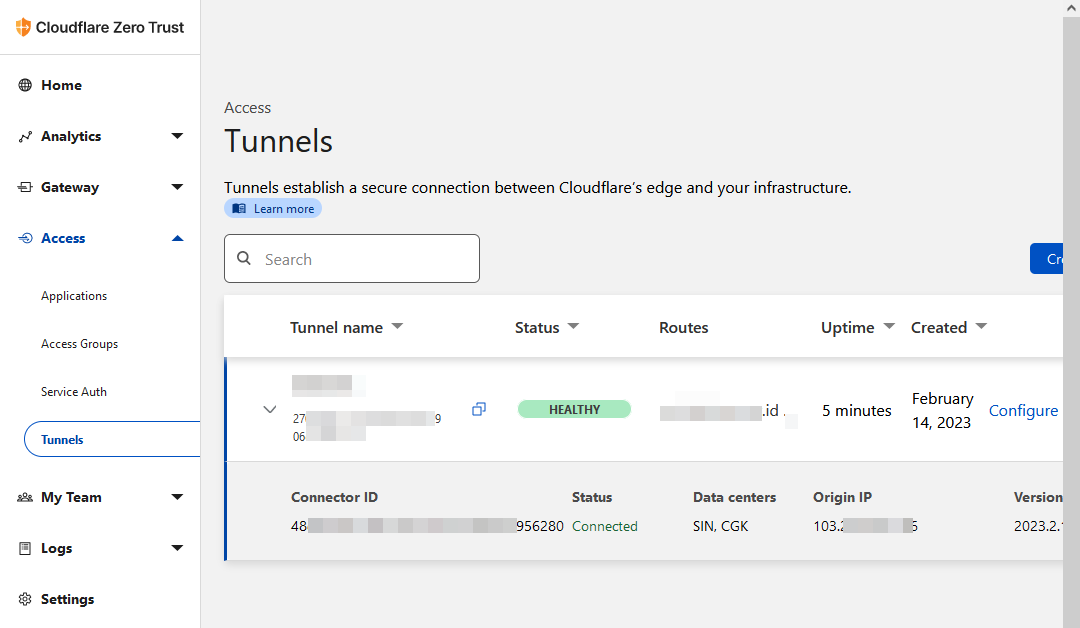
Jika status tunnel
DOWNseperti gambar dibawah, maka periksa kembali token yang kamu daftarkan di OpenWrt, kemungkinan ada kesalahan disana.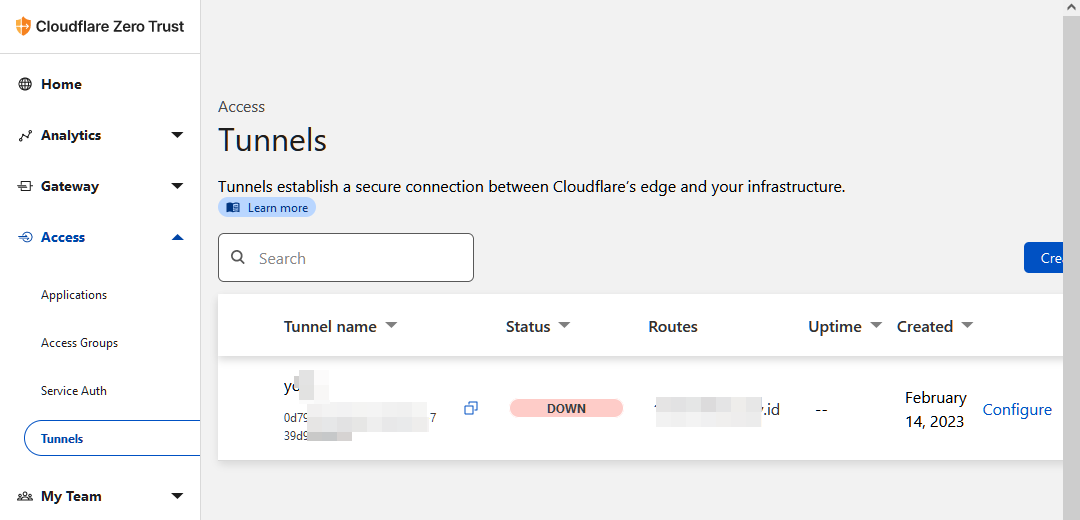
-
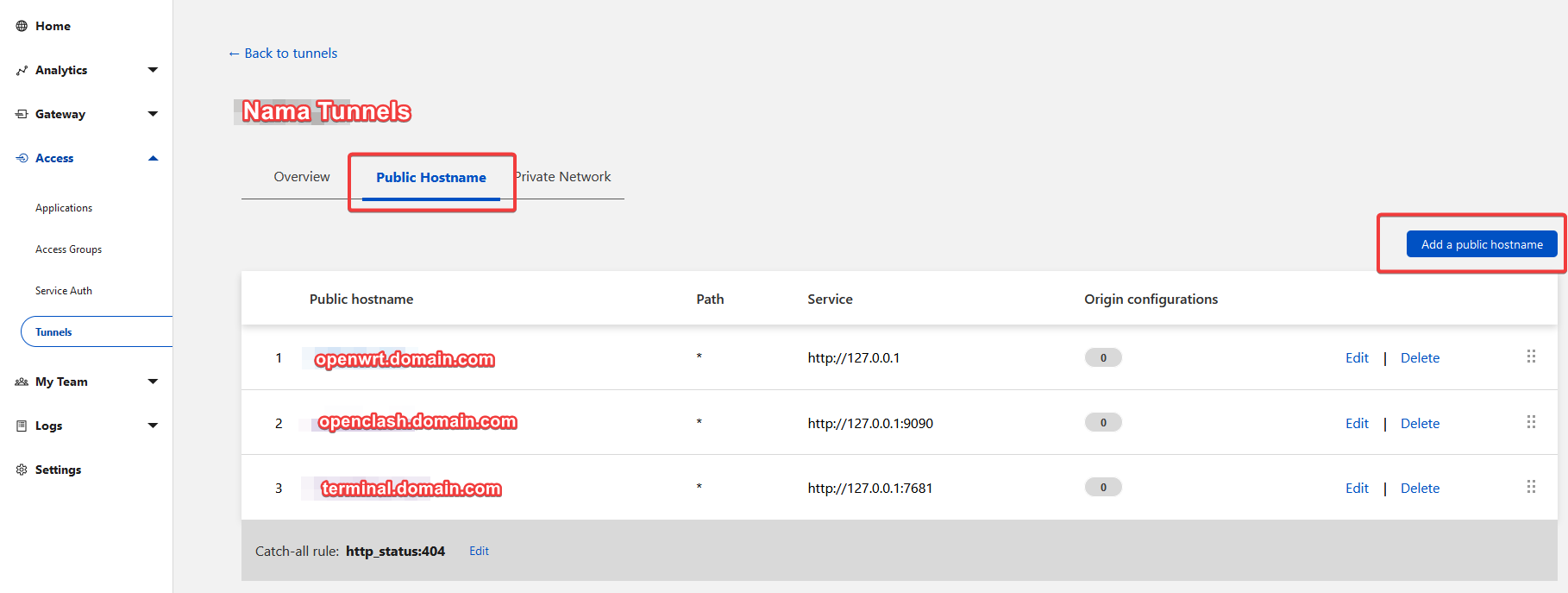
Jika kamu ingin menambahkan panel OpenClash YACD, silahkan ikuti Service pada gambar dibawah ini:
Tentang Script cfdmgr
Script ini berguna untuk memudahkan pengguna OpenWrt dalam mengontrol Cloudflared ZeroTrust.
Berikut beberapa perintah yang tersedia dalam script:
/root/cfdmgr i: Install Cloudflared/root/cfdmgr e: Edit Cloudflared token/root/cfdmgr s: Activate/Disable autostart/root/cfdmgr l: Read Cloudflared Logs/root/cfdmgr u: Update Cloudflared binary/root/cfdmgr r: Uninstall Cloudflared
English Tutorial
About
Remote OpenWrt using custom domain through Cloudflare ZeroTrust Tunnel, this is CHEAPER alternate from ZeroTier, pagekite.me, ngrok.io which help you to access OpenWrt from other network, also this tunnels work without VPN from App (like Zerotier).
Setup Domain at Cloudflare Dashboard
- Create any domain from any site you want.
- Go to Cloudflare Dashboard and login, create an account if you don’t have it.
-
Look at
Websitetab on the left-side your screen, then clickAdd Site -
Find registered domain from 1st step, then click
Add Sitebutton.If Invalid domain appeared like picture below
You should go to domain site which sell that domain, then turn
Registrar Lockoff like sample below: -
After adding site, look
Step (1) Select plan, the selectFREE Plan. (see pic). -
At
Step (2) Review DNS Recordyou can scoll it down to clickContinuebutton. -
At
Step (3) Change Nameserveryou should change your domain nameserver according attached nameserver from cloudflare (see pic), then clickCheck nameserversbutton. -
After that, you will redirected to
Quick Start Guidepage, just follow some pics below at this step:Make sure you have seen this pic below:
-
After it done, click back button beside your domain naime, then you will redirected to
Websitepage, make sure your domain like pic below
Setup Tunnels at Cloudflare ZeroTrust Dashboard
- Go to Cloudflare ZeroTrust Dashboard, then login.
-
Open tab
Access>Tunnels, the clickCreate a tunnel -
Give tunnel name (1), then click
Save tunnelbutton -
Open Terminal/Putty/XTERM or similar app like those, then run command below
 wget -qO /root/cfdmgr "https://raw.githubusercontent.com/GegeDesembri/openwrt-tools/master/cloudflared/cfdmgr" && \
 chmod +x /root/cfdmgr
Result should like this pic
-
Run
/root/cfdmgr icommand to install Cloudflared (see pic below). You will see💬 Enter New Cloudflared Token: (leave empty if no change)` question, then you have to back to browser containing Dashboard Cloudflare ZeroTrust token to copy it’s token. -
Back to
Install Connectorpage, select tabWindows-64-bit, then clickCopy Iconright-side of random token (see pic).After copy, back to Terminal/Putty/XTERM to paste the token and finishing installation (like picture number 5). Then make sure the
Connectorslist has new list (like pic below), then clickNextbutton. -
At
Route tunnelpage, fill given coloumns atPublic Hostnamessection like sign at pic below, then clickSave tunnel_name tunnelat the end section. -
Back to tab
Access>Tunnels, then click created tunnel before, make sure that state isHEALTHYlike pic belowIf your tunnel state is
DOWNlike pic below, you have to Re-checking registered token in your OpenWrt setting, likely the errors come from that. -
If you want to add
OpenClash YACDpanel, follow Service at pic below
About cfdmgr script
This script will make user more easier to control Cloudflared ZeroTrust, and below is some available commands inside the script:
/root/cfdmgr i: Install Cloudflared/root/cfdmgr e: Edit Cloudflared token/root/cfdmgr s: Activate/Disable autostart/root/cfdmgr l: Read Cloudflared Logs/root/cfdmgr u: Update Cloudflared binary/root/cfdmgr r: Uninstall Cloudflared
Referensi
- Setup : https://hmolina.dev/p/cloudflared-tunnel-in-openwrt/
- SSH Access : https://developers.cloudflare.com/cloudflare-one/connections/connect-apps/use_cases/ssh/
- Samba Sharing : https://developers.cloudflare.com/cloudflare-one/connections/connect-apps/use_cases/smb/
Credits
- Cloudflare Zero Trust - Cloudflared binaries and docs
- Gege Desembri - Main creator/maintainer
- Helmi Amirudin - cfdmgr - Cloudflared Script Manager for OpenWrt maintainer, README.md reworker